Glossary
Action Bar


The sticky bar at the bottom of the Chapter Editor. Holds the selection count, undo/redo, the tools/settings menu, the AI Cleanup button, and the Review button. It can be docked to the left or right edge of the screen as a vertical toolbar, where the menu items appear inline.
Additional Instructions
Per-session formatting rules for AI Cleanup. Unlike Custom Instructions, these are not saved across sessions; use them for book-specific tweaks.
AI Cleanup
A post-processing step that sends your chapter titles to an LLM and asks it to clean them up. See AI Cleanup.
ASIN
Amazon Standard Identification Number. A 10-character ID used by Audible to uniquely identify a book. The same book may have different ASINs across different regions. Audiobookshelf and Achew use it to fetch Audnexus chapter data.
Audiobookshelf (ABS)
The open-source self-hosted audiobook server Achew integrates with. https://www.audiobookshelf.org
Audnexus
An audiobook metadata service, primarily sourced from Audible data. Achew can pull chapter data and titles from it by ASIN. https://audnex.us
AVX2
A CPU instruction set required by the Whisper transcription model in the standard Docker image. CPUs from before ~2013 (Intel) or ~2015 (AMD) may not support it. Using the legacy-cpu Docker image tag works around this.
Back Menu
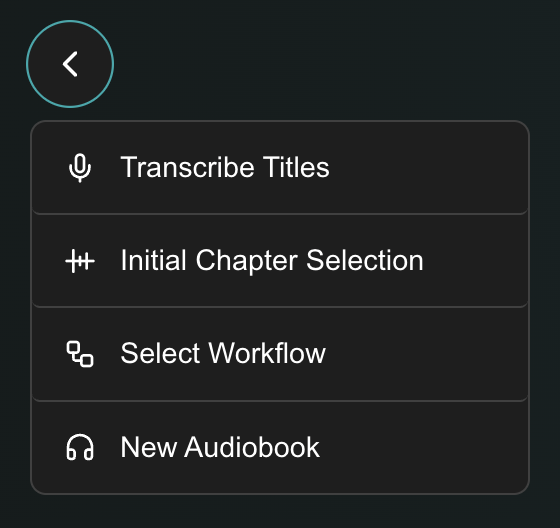
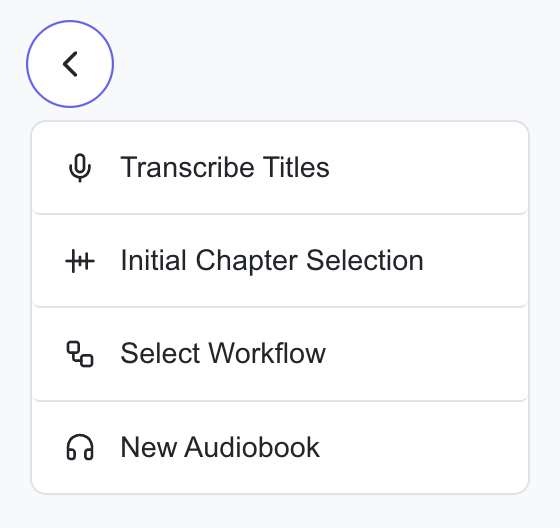
The dropdown shown after clicking the Back button at the top-left of the screen. Lets you jump back to an earlier step of the current Session (Select Workflow, Initial Chapter Selection, Transcribe Titles, Edit Chapters), or end the session entirely by choosing New Audiobook. Jumping to a pre-editor step resets all data to that point and clears undo history.
Bias Words
A custom vocabulary passed to Whisper to bias the model toward specific spellings (e.g., "Chapter", "Part", a character's name). See Transcription.
Chapter
A timestamp + title. Every row in the chapter editor is a chapter.
Chapter Editor
Achew's main editing interface for chapter lists, shown at the end of every workflow. Each row displays a chapter's timestamp, transcript, and title alongside per-chapter controls for adding, transcribing, playing, and deleting. The Action Bar sits at the bottom of the screen by default and can be docked to either side. See Chapter Editor Overview.
Chapter Reference
See Chapter References.
Cue
A candidate chapter boundary produced by Achew's audio analysis: a detected silence or voice-activity gap. Cues have a timestamp but no title. See Chapters vs Cues.
Cue Selection Slider


The primary slider shown on the Initial Chapter Selection screen after Smart Detect runs. Maps to a silence-gap threshold, filtering the detected cues to produce more or fewer chapters. Not to be confused with Intro/Outro Sensitivity, the secondary slider on the same screen that only biases cues near the book's start and end.
Custom Instructions
Reusable formatting rules for AI Cleanup. They persist across sessions and supersede Achew's default rules, making them a good place to encode personal style preferences for your library.
Dramatized
Achew's detection mode for audiobooks with music and/or sound effects. Uses VAD instead of silence-threshold detection to find chapter boundaries. It's significantly slower, but also significantly more accurate for dramatized audiobooks.
Embedded chapters
Chapters baked into an audio file's metadata. Achew reads these from Audiobookshelf and exposes them as the Embedded Chapters Reference.
File Data
An auto-added Chapter Reference for multi-file books. Each track becomes one chapter, with timestamps derived from the file durations and titles derived from the file names.
Initial Chapter Selection
The screen Achew shows after Smart Detect finishes analyzing audio. You use the Cue Selection Slider, Intro/Outro Sensitivity slider, and (optionally) Reference comparison to choose which detected cues become chapters. See Smart Detect → Initial Chapter Selection.
Library Files
Files stored in the same folder alongside the original audiobook files, visible in the Library Files section of the book's detail page. Achew auto-loads Chapter References from files named chapters.json, chapters.csv, *.cue, titles.txt, *.epub, *.mobi, *.azw, or *.azw3.
LLM
Large Language Model. The AI Cleanup feature uses one of several LLMs: OpenAI, Anthropic Claude, Google Gemini, OpenRouter, GitHub Copilot, Ollama, or LM Studio.
MLX
Apple's hardware-accelerated machine-learning framework for Apple Silicon. Achew's MLX transcription models run dramatically faster than CPU versions on M-series Macs. Only available via native install, not Docker.
Multi-file book
An audiobook comprised of multiple audio files (often one file per chapter), as opposed to a single-file book stored as one contiguous file. For multi-file books, Achew automatically includes a File Data Reference built from the file names and durations.
Parakeet
NVIDIA's transcription model family. Achew ships with both CPU and MLX (Apple Silicon) variants, and offers two model sizes: 0.6B v2 (English only, recommended for English audio) and 0.6B v3 (multilingual, 25 languages; see Supported Languages).
Realignment
The process of fixing misaligned chapter timestamps using audio detection. Achew runs targeted detection around each Reference chapter and shifts timestamps to the best-fitting cue. See the Realign Chapters workflow.
Reference
See Chapter References.
Session
Achew's working state for a single book. Begins when you select a book and click Start, and ends after you submit to Audiobookshelf or pick New Audiobook from the Back Menu. The chapter list, loaded References, and undo history are held server-side for the duration of the session, so no data is lost if you close the browser.
Transcription
The process of converting an audio segment into text using an on-device speech-to-text model. Achew runs transcription locally for chapter titles using Whisper or Parakeet; nothing is uploaded to a third party. See Transcription.
VAD
Voice Activity Detection. A class of algorithm that distinguishes speech from non-speech audio (silence, music, sound effects). Achew uses VAD in Dramatized mode to find cues in audio that rarely goes truly silent.
Whisper
OpenAI's multilingual transcription model. Supports 99+ languages. Achew ships with both CPU (whisper.cpp) and MLX (Apple Silicon) variants. Each model size except large and turbo also has an English-only (.en) variant that tends to be more accurate for English audio.
Workflow
A set of task-oriented processing steps taken after selecting a book: Smart Detect, Realign Chapters, Regenerate Titles, and Quick Edit. Each workflow feeds into the chapter editor.
xHE-AAC
Extended High-Efficiency AAC. A newer audio codec Achew does not fully support. Books encoded with xHE-AAC may fail Smart Detect, realignment, transcription, or playback. See Supported Formats.